

The Bulk Uploader Skill
Put Your Whole Dropbox Folder Into Your Kajabi Course, Automatically
Two hundred files. Nine units. Claude uploads every one, puts it on the right lesson, names it and orders it, while you watch. Next month you run it again and it only does what changed.
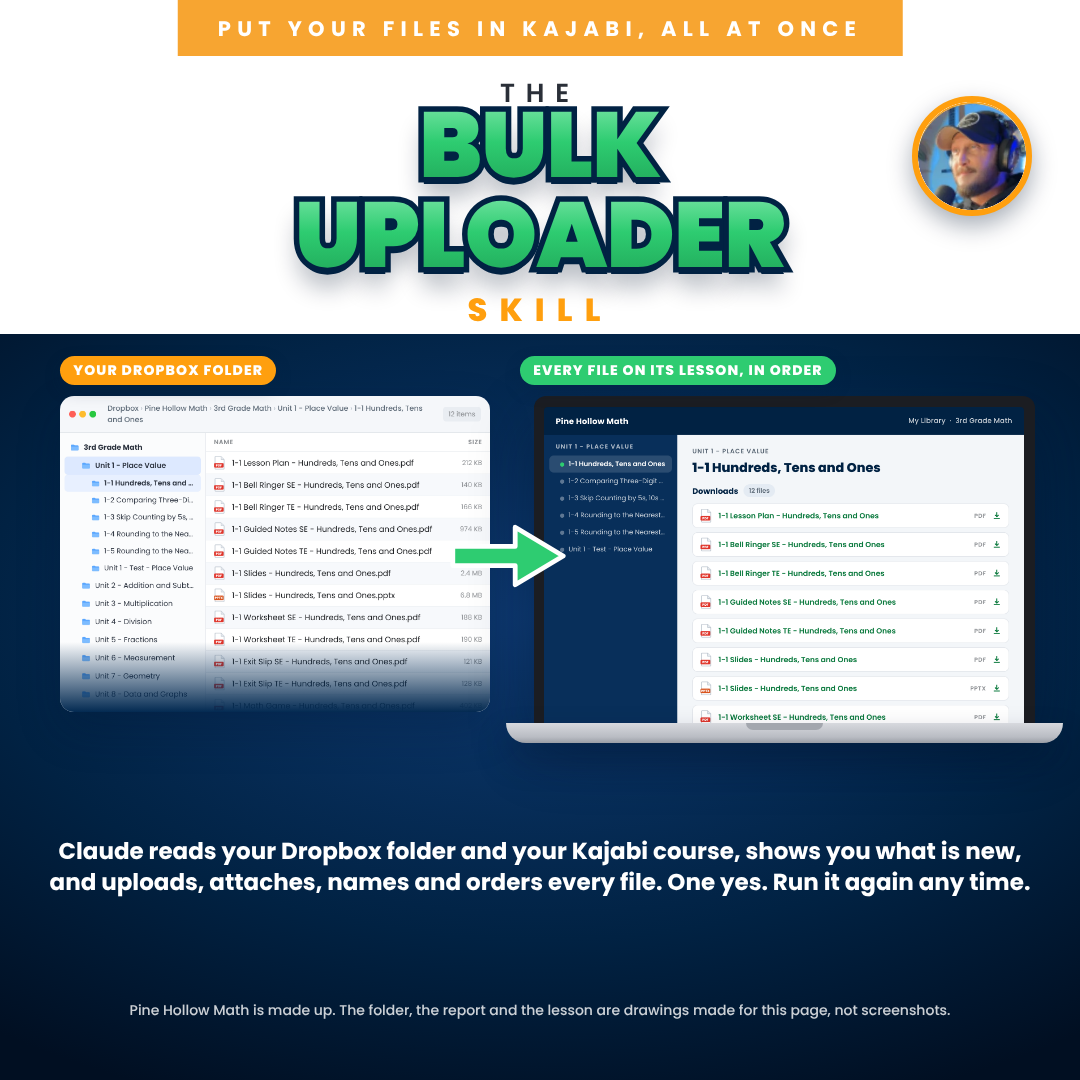
A skill is a set of directions you add to your own Claude. This one has an AI named Claude read your Dropbox folder and your Kajabi course, show you exactly what differs, and on your yes make the course match the folder.
Nothing is uploaded until you say yes to the sync report. Claude never deletes anything, and new lessons stay drafts until you say publish.
One payment of $97. Use it on every course you have, as often as you like.
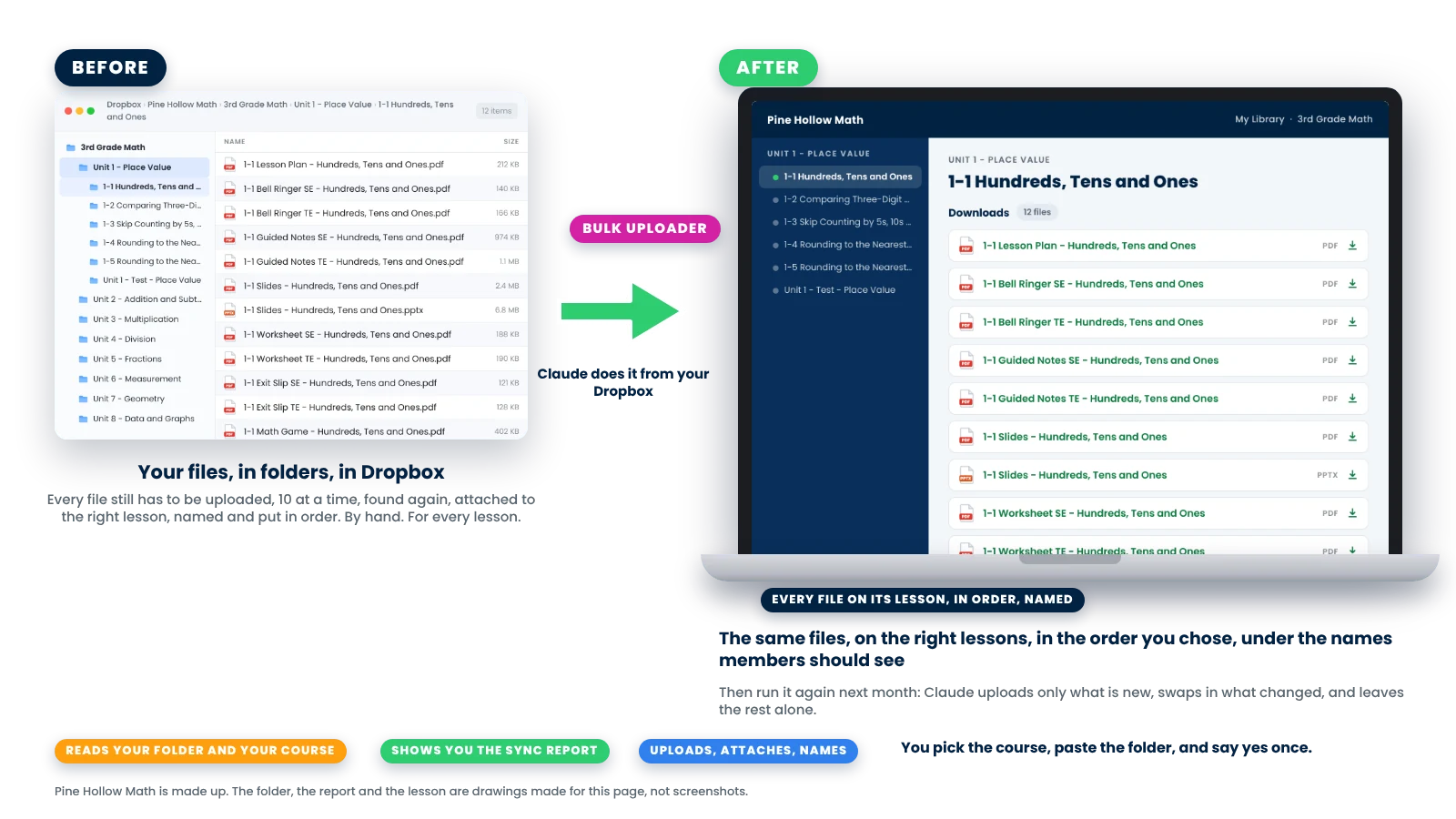
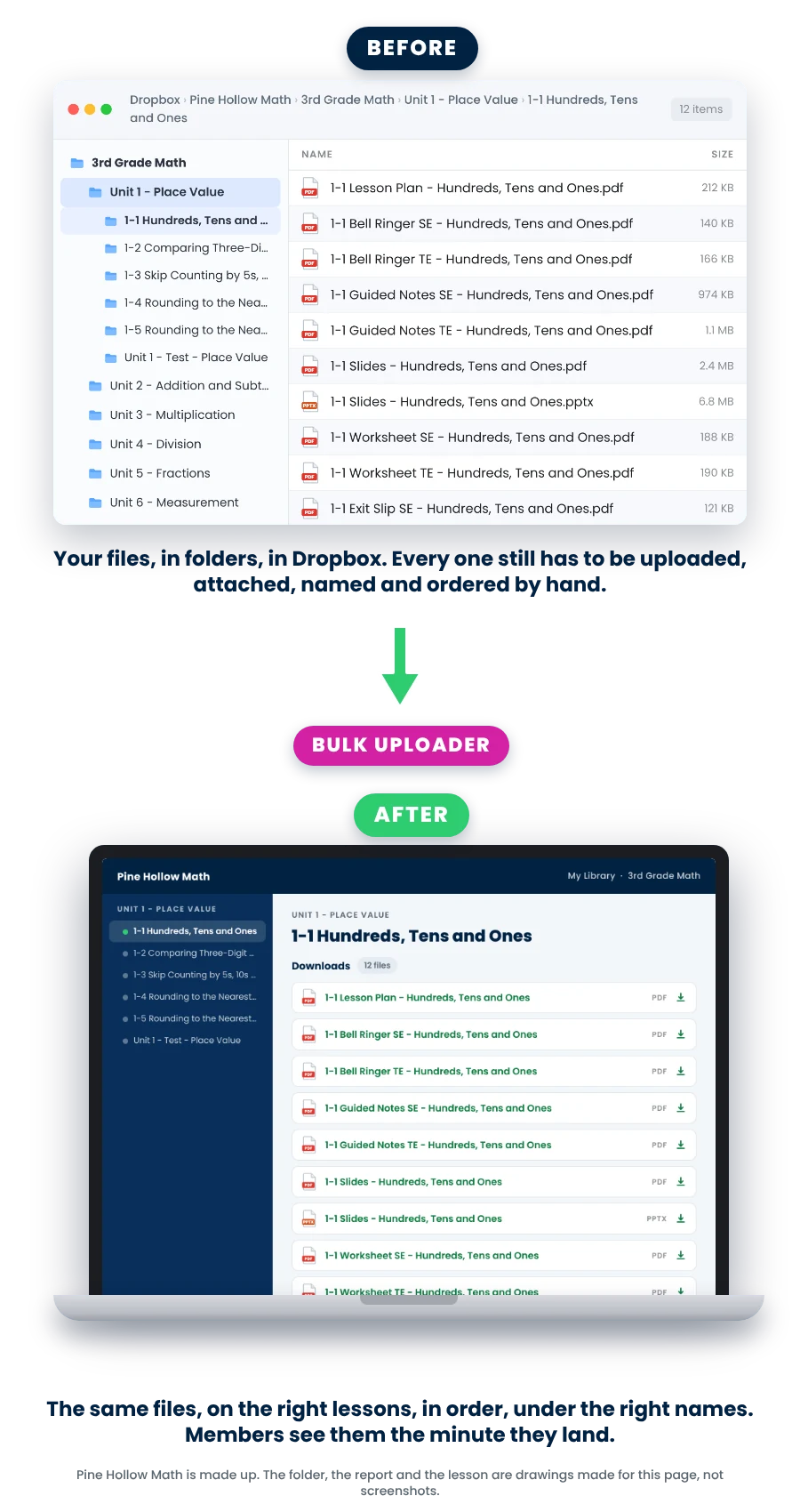
Uploading by hand is the part of Kajabi nobody warns you about. 😩
You built the resources. Now every one of them has to get into Kajabi: open the lesson, click Add file, find the file, wait, name it, drag it into order. Ten files at a time. Two hundred times. And when you fix a typo in a worksheet next month, you do that one again and hope you remembered every lesson it was on.
Uploading by hand
An afternoon per unit. Then another one.
- Every file picked by hand from a folder you have to keep finding
- Downloads named whatever the file was called, in whatever order they landed
- A fixed file swapped in on one lesson and forgotten on the other two
- No record of what went up, so the next unit means starting from the top
With the skill 👉
One folder. One report. One yes.
- Claude reads your Dropbox folder and your course and lines them up: folder to module, folder to lesson
- It shows you one line per file: new, changed, same, gone, and what it plans to do
- On your yes it uploads, attaches, names and orders every file, and swaps changed files in everywhere they are used
- Next month it reads its notes and does only what changed
This is the part of building a course that eats weekends. The skill turns it into one report and one yes, and it keeps the same record for next month, so your course and your folder never drift apart again.
Point it at the folder. Say yes once.
Here’s what the skill actually does 😎
There’s a one-time setup: add the skill file to your own Claude, switch on the Kajabi and Dropbox connectors, and sign in to Kajabi inside Claude’s browser. Then one chat, in seven short parts, with a printed one-page sheet that uses the same part numbers.
💬
1. You pick the course and paste the folder.
Claude lists your Kajabi courses and you pick one. You paste the Dropbox folder: a folder per unit, a folder per lesson inside it, the files inside that. Claude reads both sides, every page of every list, and matches your folders to the modules and lessons already there. Where a folder and a lesson disagree, it asks. Kajabi’s names win, and nothing is renamed on its own.
📋
2. Claude shows you the sync report, and you say yes.
One line per file: new, changed, same, gone from Dropbox, or unmatched, with what Claude plans to do. It asks the order you want (lesson plan first is my default), whether to name the downloads “1-3 - Worksheet” style, what to do with each zip, and how much to do this sitting. Nothing is uploaded until you say yes.
⬆️
3. Claude builds, uploads, attaches, and shows you one lesson first.
Missing modules and lessons are created as drafts in the right place. Files go up from Dropbox through Kajabi’s own upload window, one as a test, then ten at a time. Each one lands on its lesson under its name in the agreed order, changed files are swapped in everywhere they are used, and Claude does one lesson first so you can open its Preview before it does the rest.
That’s it. Just follow it. It works.
At the end Claude verifies the counts, gives you the list of old versions to delete (it never deletes anything itself), asks whether to publish the new lessons, and saves its notes beside your folder so the next run is a true comparison, not a repeat.
Members see a download the moment it lands on a published lesson. That is why Claude does one lesson first and asks you to look before it does the rest.
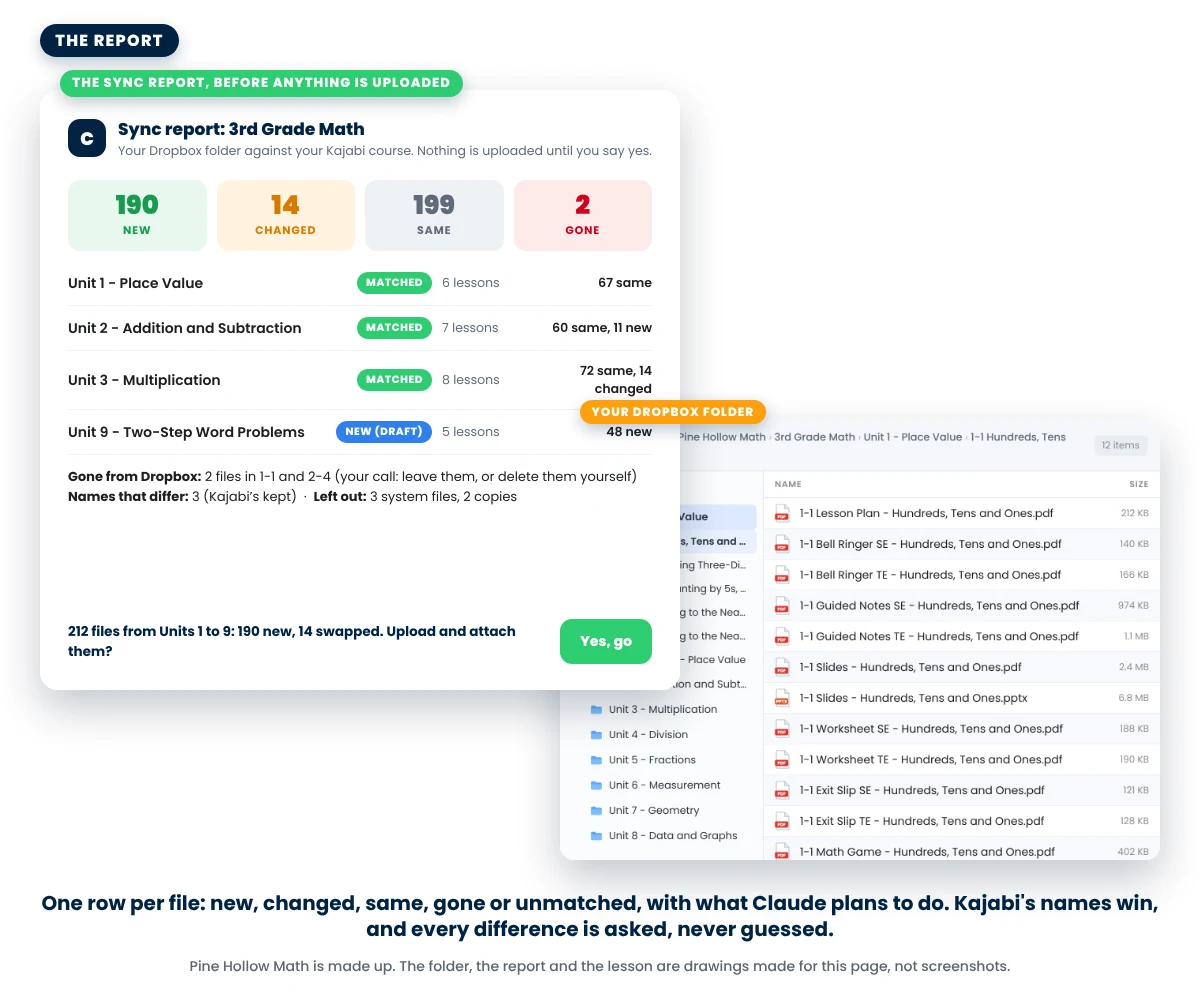
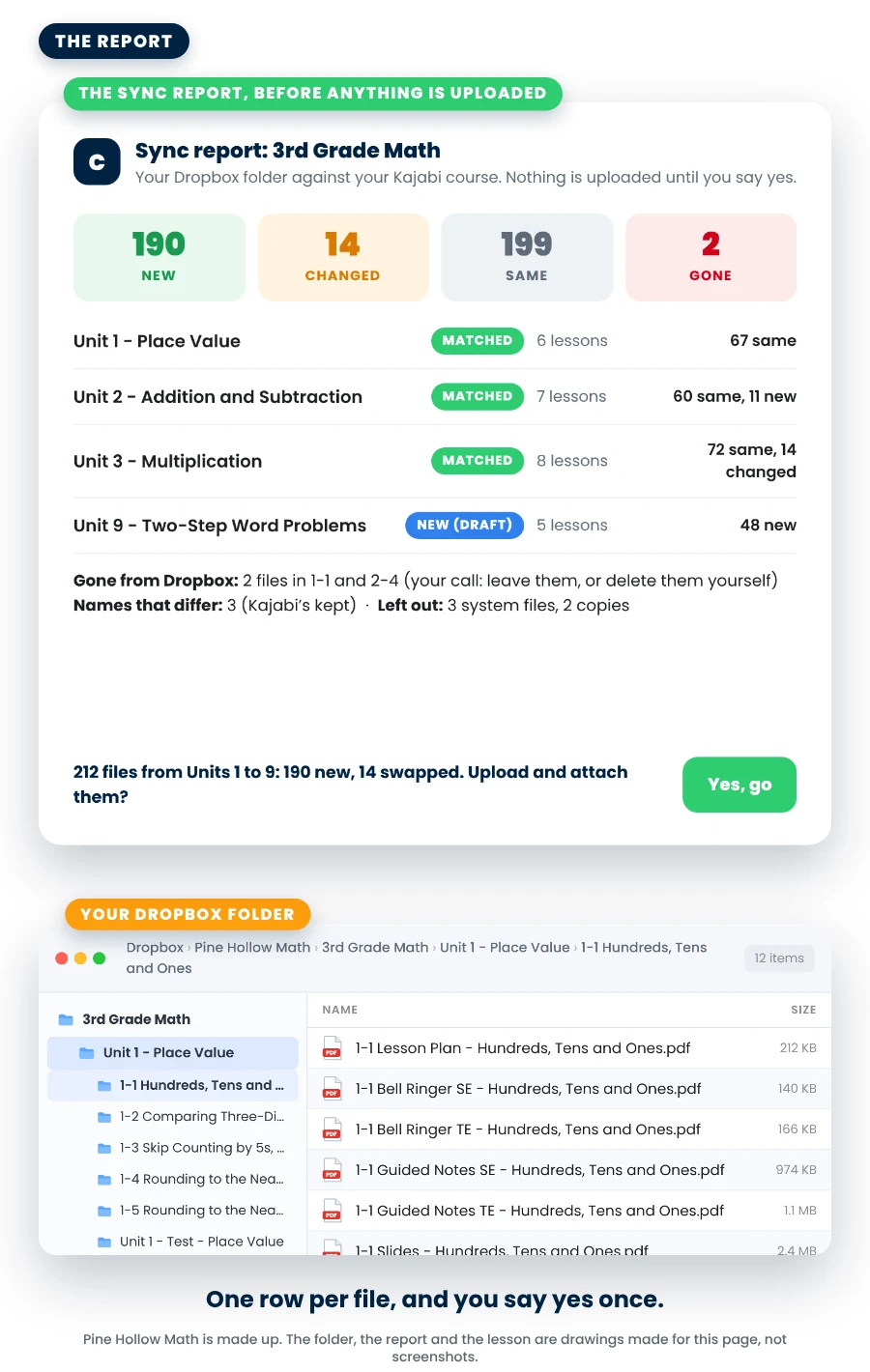
Part 4: the sync report
One line per file. Nothing moves until you say yes.
Claude reads your folder and your course, every page of both, and tells you what differs: the files that are new, the ones whose contents changed, the ones already there, the ones gone from Dropbox, and anything it could not match. Then it says what it plans to do with each.
- Kajabi’s names win. A lesson keeps the name it has, whatever the folder says. Every difference is listed and you decide. Claude never renames on its own.
- The order is yours. Lesson plan first, then your teaching order, is my default. Claude proposes it from the file types and asks.
- The names are yours too. Claude suggests “1-3 - Worksheet” style names, lesson number first, and asks. Downloads already in Kajabi keep their names unless you say otherwise.
- Zips get their own question. Unzip it into a folder beside the zip, so members get the files inside as separate downloads, or upload it whole. Your choice, per zip.
How big a job this fits: each file passes one link through the chat, so a few hundred files is an afternoon and a few thousand is several chats. You choose how much to do each sitting, and the notes pick up where you stopped.
Parts 5 and 6: build, upload, attach, swap
Every file on its lesson, in order, under the right name. Changed files swapped in everywhere.
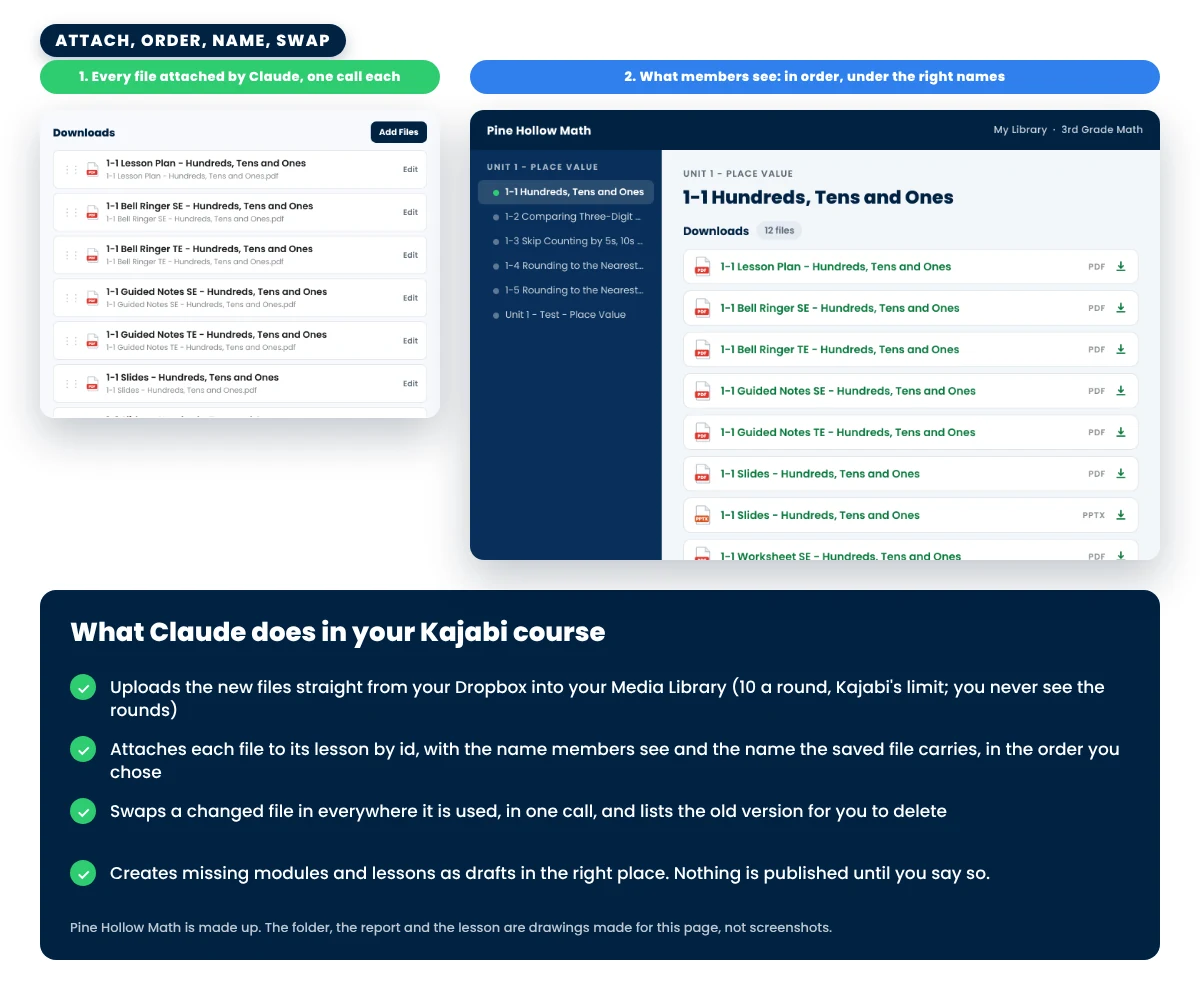
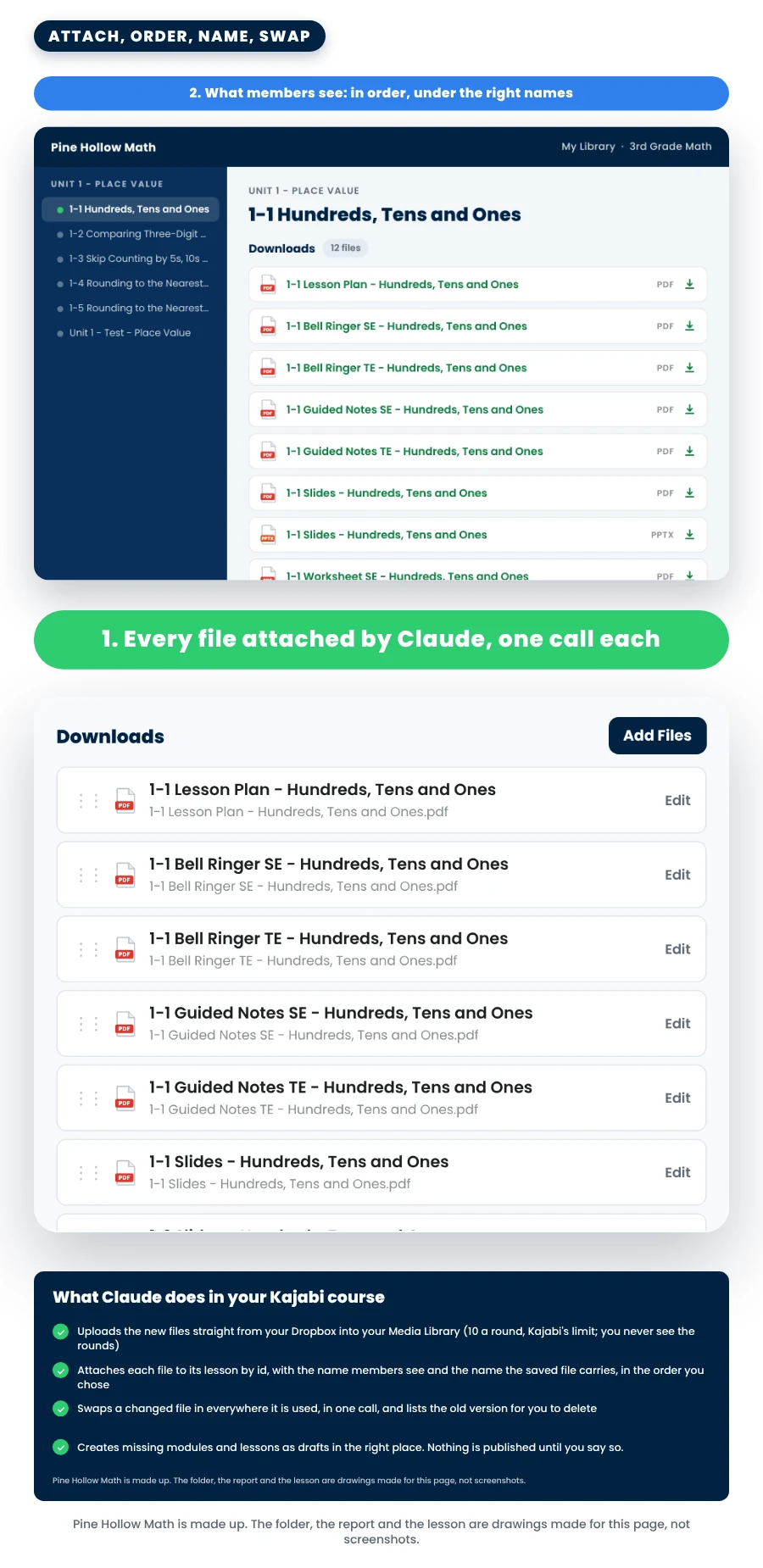
Claude uploads from Dropbox through Kajabi’s own upload window in its built-in browser, ten files a round after a one-file test, and checks every one arrived. Then it attaches each file to its lesson by id, sets the name members see, and puts the downloads in the order you chose.
- Changed files are swapped, not doubled. A worksheet you fixed is uploaded fresh and swapped in everywhere the old one is used, in one call. The old version goes on your delete list, tagged “Delete me” with the date if you say yes.
- Missing lessons are made as drafts, in position, between the lessons that are already there. A draft shows members nothing until you say publish.
- Videos go up too, one per lesson, into the lesson’s video player. Audio files are the one thing you upload by hand, and Claude lists which.
- Nothing is ever deleted by Claude. Not a file, not a download, not a lesson. The delete list is yours.
Pictures are a different skill: a lesson with no picture shows a gray box, and The Mockup Builder Skill makes the thumbnails from your own pages and puts them on. If you have it, run it after this one.
👋🏼 Hi, I’m Jeff Twiddy
What you get for $97
- The Bulk Uploader skill file, to add to your own Claude. One file, added once.
- Printed directions, one page: the message to send, the seven parts, the things only you can do, and the words to say when you come back.
- Three short lessons: add the skill, put your files in Kajabi, coming back later.
- Use it on every course you have, as often as you like. No per-file fee, no per-course fee.
From every run:
- New files uploaded and attached to the right lesson, named and in order
- Changed files swapped in everywhere they are used, with the old version on your delete list
- Missing modules, sub-modules and lessons created as drafts, in position
- A notes file and a file map beside your folder, so the next run does only what changed
One payment of $97. Use it on every course you have, as often as you like.
✅ What you need before you buy
Four things. The third one is the one people miss: the files have to be in Dropbox.
🖥️
A paid Claude plan and the Claude desktop app on a Mac or Windows computer
Claude is the AI assistant that does the work. Any paid plan works: Pro, Max, Team or Enterprise. It reads your course through the Kajabi connector, reads your folder through the Dropbox connector, and uploads through Kajabi’s own upload window in its built-in browser, which is why it needs the desktop app. A phone or a Chromebook will not do it. On Team or Enterprise, your admin may need to turn on skills and connectors first.
🔗
A Kajabi account with the course already made
Even an empty course works: Claude creates the modules and lessons it finds in your folder, as drafts. What it does not do is build a membership from scratch, with the pictures, the offers and the pages. That is my Walk-Away Number Challenge™. If you did the challenge, the skill reads your build notes and asks even less.
📁
Your files in one Dropbox folder
A folder per unit, a folder per lesson inside it, the lesson’s files inside that, named the way members should read them. Dropbox only, because the upload runs on Dropbox’s one-time download links. A free Dropbox account works, and files on Google Drive or on your computer can be moved there first.
🔐
Kajabi signed in inside Claude’s browser
The uploads and the attaching run in Claude’s built-in browser, so once a sitting you open it (Cmd+Shift+B on a Mac, Ctrl+Shift+B on Windows) and sign in to Kajabi there. You sign in. Claude never types a password, never presses Delete, and never publishes a lesson without being asked.
💵 Claude is its own bill.
This skill doesn’t include a Claude plan. Check Claude’s prices at claude.com/pricing. Kajabi and Dropbox are their own accounts too. Check Kajabi’s prices through my partner link in the lessons.
Back up your files first. Claude only reads them and never deletes anything, but keep a copy somewhere Claude is not connected to. And nothing goes live from Claude that you did not ask for: new lessons are drafts until you say publish.
“But what if...”
Let’s handle your questions.
“I’m not technical.”
“What is Claude?”
“Is this the course builder from your Walk-Away Number Challenge?”
“How does Claude know a file changed?”
“What about files that are in Kajabi but not in my Dropbox anymore?”
“Will my members see a half-finished course?”
“How long does it take?”
“What if there is a zip in the folder?”
“Does it do the pictures?”
“What if Claude changes something?”
“Can I get a refund?”
“Can I share the skill?”
One payment of $97. Use it on every course you have, as often as you like.


Who’s behind this
I was a high school math teacher for 13 years and a head football coach. Then I built and sold multiple multi-million dollar curriculum businesses.
I’ve helped over 1,000 teacher sellers build real businesses beyond TPT: memberships, automated funnels, profitable ads, and recurring revenue that doesn’t depend on any algorithm.
This skill does the part of a Kajabi build that eats the most time: getting every file onto the right lesson, named and in order, and keeping it that way. I test everything I teach in my own business, so when it gets into your hands, it already works.
1,000+ teacher sellers helped8+ figures earned13 years in the classroom
Your files belong in your course, not in your weekends.
One payment of $97. Use it on every course you have, as often as you like.
The folder, the sync report and the lesson shown on this page are drawings made in October 2026 to show the skill, not screenshots. Pine Hollow Math is a made-up seller (not a real store), and its units, files and counts are made up too. Kajabi’s connector and upload window were checked on a real Kajabi site in October 2026 and can change. The lessons link to Kajabi with our partner link: we earn a commission if you sign up for Kajabi through it, at no extra cost to you. Claude is made by Anthropic. Kajabi, Dropbox and Anthropic are separate companies and separate accounts, and none of them sponsors or endorses this skill. Teacher Seller School is not affiliated with or endorsed by TPT (Teachers Pay Teachers).
Earnings Disclaimer: This skill puts files into a course in your Kajabi account. What you earn depends on your products, your prices and your marketing, and there is no guarantee that you will earn any money using it. Subject to our Refund Policy, we provide content without any express or implied warranties. By continuing to use our site and access our content, you agree that we are not responsible for any decision you may make regarding any information presented or as a result of purchasing any of our products or services.